
Industry
Home Services, Plumbing
Business Type
Small Business Automation
Services Delivered
Agent Design, Automation & Dashboard Build
Platform
Google Calendar + Python
Overview
When the owner adds a job to Google Calendar, the system reads the details, fills a ready made Word contract document, and emails it to the receptionist instantly, with no manual steps, while logging every order in a live dashboard.
It replaces a slow, error prone hand typing process with a single automatic pipeline triggered the moment an event lands on the calendar.
The Problem & The Solution
The Problem
Sales reps book appointments on a shared calendar. Someone then has to hand type each one into a Word document order form and email it, a process that is slow, repetitive, and error prone.
The Solution
Google Calendar becomes the starting point for the entire workflow. As soon as a new event is added, the system automatically generates the contract, emails it to the receptionist, and records the job in the dashboard, all within seconds.
Architecture
The solution consists of three connected stages: Google Calendar captures new jobs, an automated workflow processes the information, and the application generates contracts, sends emails, and displays live job updates in a dashboard, all in real time.
01.
Job Scheduled
The business owner creates a new job in Google Calendar with all the required details.
02.
Workflow Triggered
The new calendar event automatically starts the workflow and sends the job information to the application.
03.
AI Processing
The application extracts the job details, generates the contract, emails it to the receptionist, and records the job.
04.
Completed Instantly
The completed contract is delivered by email, and the new job appears instantly in the live dashboard.
Job Scheduled
The business owner creates a new job in Google Calendar by adding the customer details, appointment information, address, and service requirements.
Automation Triggered
As soon as the calendar event is created or updated, the workflow starts automatically and securely sends the job information to the application.
Job Information Processed
The application validates the request, extracts the appointment details, and organizes the information into a structured format for processing.
Contract Generated
A professional Word contract is automatically populated using a predefined template, ensuring every document is accurate and consistent.
Contract Delivered
The completed contract is instantly emailed to the receptionist, allowing the team to begin processing the job without manual document preparation.
Live Dashboard Updated
Every job is automatically recorded in a centralized dashboard, where staff can view job history, monitor activity, and access generated contracts in real time.
End-to-End Workflow
The exact sequence for a single booking, from the moment the owner types into Google Calendar to the moment the receptionist has a finished contract in their inbox.
Calendar Event → Filled Contract
The Word file is a Customer Order Contract. Its equipment catalogue and prices are fixed and pre-printed, only the customer and order details are filled in from the calendar. The parser recognizes common aliases (Customer, Mobile, Address) and works even if Google collapses the description lines into one. Missing labels simply leave that field blank, and the template itself can be edited from the dashboard.
Google Calendar — Sales Appt
One "Label: value" per line in the event description
Parsed & Rendered
Customer Order Contract.docx
Customer Order Contract
Name: John Doe
Phone: 661-555-0134
Address: 123 Oak St, Valencia, CA
Invoice #: 10231
Equipment & Pricing (Fixed)
Unit A, Standard Package ...... $3,200.00
Unit B, Install & Wiring ...... $2,500.00
Total Due: $8,700.00
The Dashboard
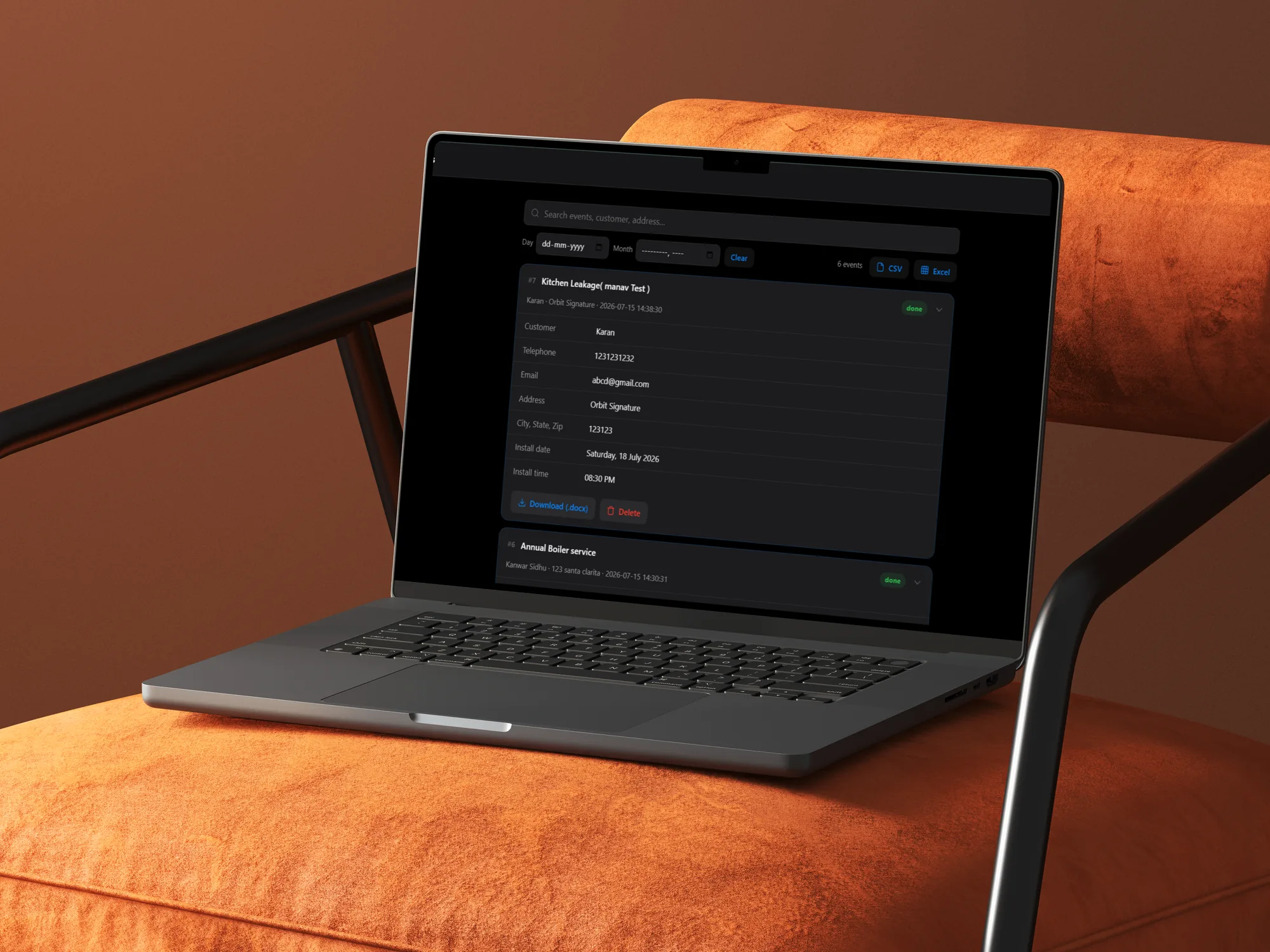
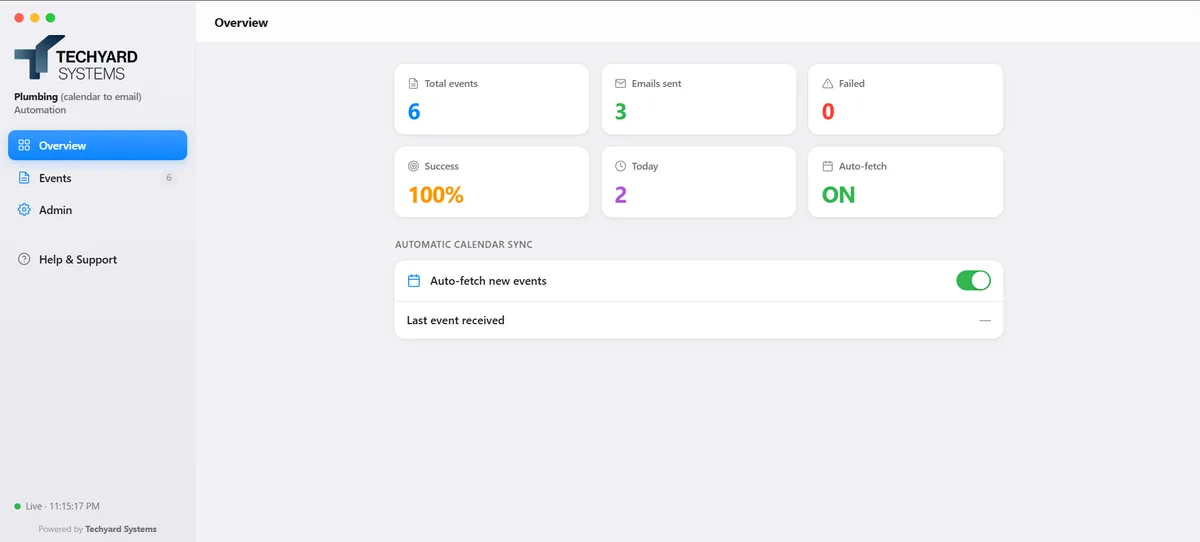
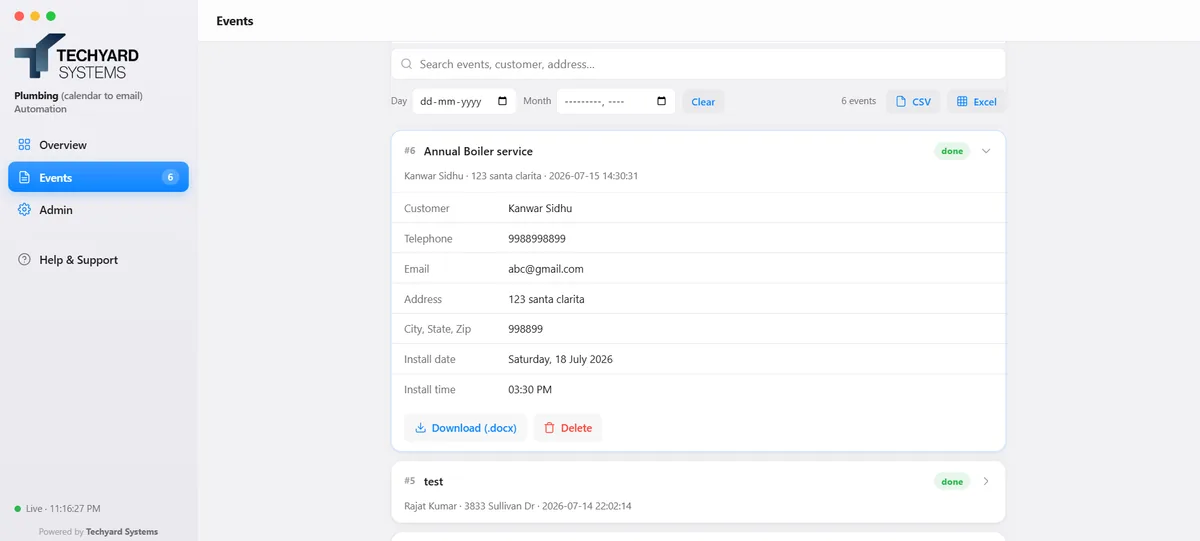
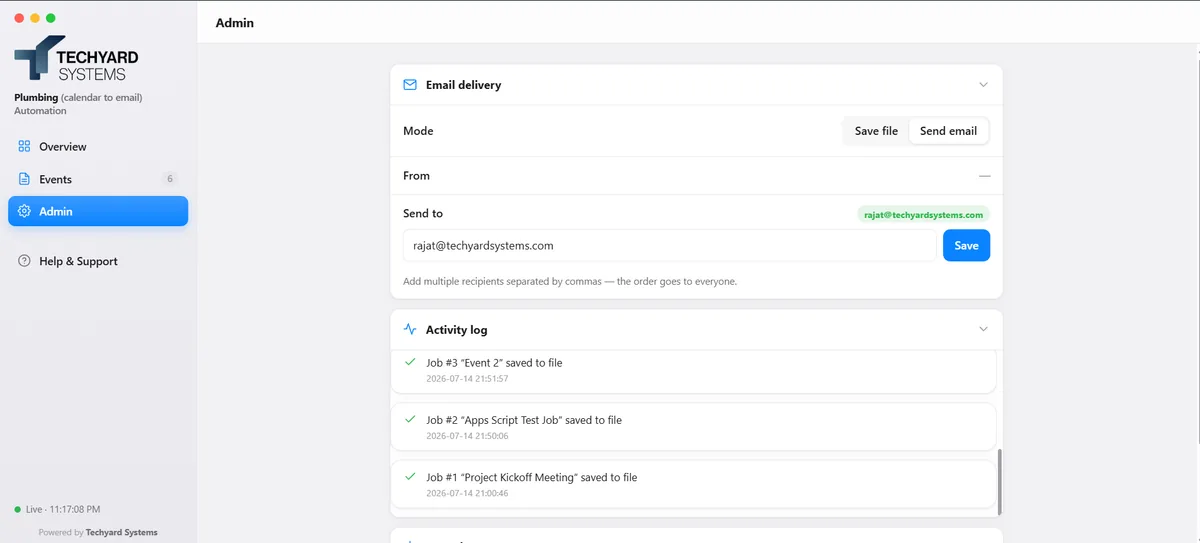
A login protected web dashboard shows live job history, stats, and every order in real time, with search, filters, and one click CSV and Excel export. Hover a screen to see what it covers.
Overview
Live TotalsEvents, emails sent, failures, and success rate update in real time.
Auto-Fetch StatusOne toggle shows whether the calendar sync is running.
Events
Searchable HistoryFilter by day or month, or search customer and address.
One Click ExportCSV, Excel, or download any single order as .docx.
Admin
Activity LogEvery job save is timestamped and listed.
Records & ThemeClear records or switch light and dark appearance.
Overview
Live TotalsEvents, emails sent, failures, and success rate update in real time.
Auto-Fetch StatusOne toggle shows whether the calendar sync is running.
Events
Searchable HistoryFilter by day or month, or search customer and address.
One Click ExportCSV, Excel, or download any single order as .docx.
Admin
Activity LogEvery job save is timestamped and listed.
Records & ThemeClear records or switch light and dark appearance.
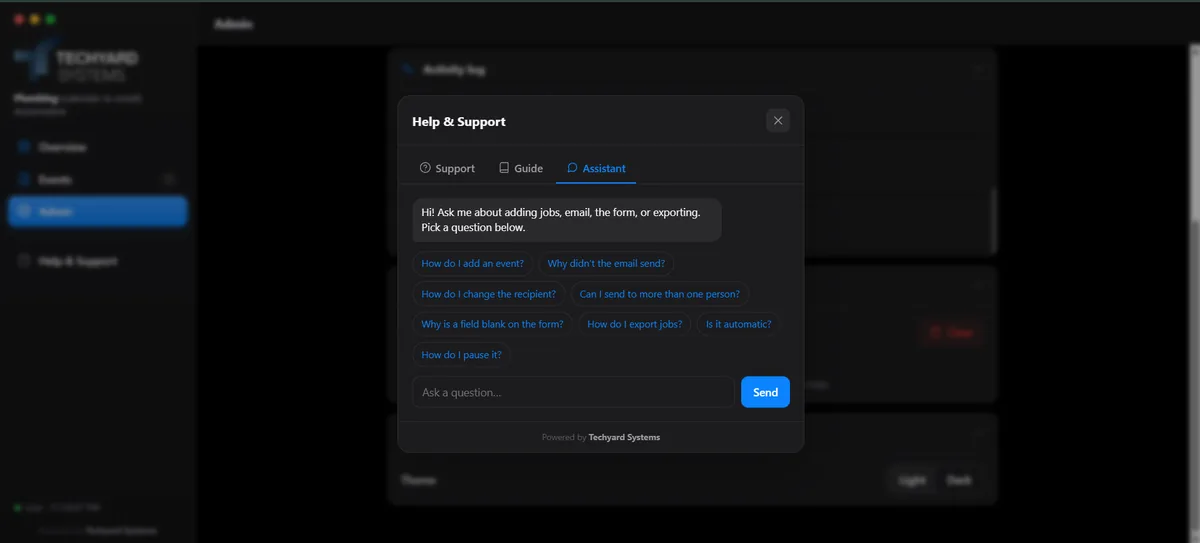
Centralized Admin Dashboard
A user-friendly admin panel lets staff manage email settings, view activity logs, track job records, and customize the application, all without writing a single line of code. A built-in AI assistant provides instant answers to common questions directly within the dashboard.
Switch between saving the contract to file or emailing it, and set who receives it, multiple recipients included.
Every job saved or delivered is timestamped and listed, a running record of exactly what the automation has done.
Clear all event history and files in one action, and switch the whole dashboard between light and dark themes.
A Help & Support panel with pre-written answers plus a small assistant for anything else, right inside the dashboard.
Key Design Decisions
Instant Event Processing
The workflow begins automatically whenever a new job is added or updated in Google Calendar, ensuring contracts are generated and delivered without delay.
Reliable Data Extraction
The system intelligently captures and organizes customer and job information, ensuring accurate document generation even when event details vary in format.
Lightweight & Easy to Deploy
Built with simplicity in mind, the solution is easy to deploy, maintain, and operate, making it an ideal fit for small and growing businesses.
Fully Configurable
Business users can update email recipients, document templates, and application settings directly from the admin dashboard without requiring developer assistance.
Security, Built In
Security is built into every layer of the solution, ensuring safe access, protected data, and reliable business operations.
- Role-Based Access — Only authorized users can access the application and administrative features.
- Secure Integrations — Every automated workflow is authenticated before data is exchanged.
- Protected Customer Data — Business information is validated and handled securely throughout the process.
- Secure Document Management — Contracts and generated files are protected from unauthorized access.
- Credential Protection — Application secrets and configuration data are securely managed behind the scenes.
Technology Stack

Python (stdlib HTTP server)
Google Apps Script
.svg.webp)
Docxtpl (Word templating)
SMTP Email Delivery

JSON File Persistence
Regex Label Parsing
Session-Based Auth
Questions This Project Answers
Still have questions?
These are the four that come up most in a walkthrough. Anything else, ask directly.
Whenever a new job is added or updated in Google Calendar, the workflow starts automatically. The system processes the job, generates the contract, sends it to the receptionist, and updates the dashboard within seconds, without any manual action.
Yes. Customer information is stored securely and is only accessible to authorized users through the admin dashboard. Security measures are built into the application to protect business and customer data.
If the application is unavailable, the job can be processed again once the service is restored. The system is also designed to support additional reliability features, such as automatic retry mechanisms, as business needs grow.
Yes. Administrators can easily update document templates, email recipients, and application settings directly from the dashboard, no coding or redevelopment required.
Built for Today. Ready for Tomorrow.
The solution is designed to solve today's business challenges while providing a strong foundation for future expansion.
Current Capabilities
- Automated contract generation from Google Calendar
- Live dashboard for job tracking
- Secure document generation and email delivery
- Simple administration and configuration
Planned Enhancements
- Cloud-hosted deployment
- High-availability processing with automatic retries
- Multi-user access and role management
- Database-backed reporting and analytics
- Multi-location and multi-calendar support
- Enterprise-scale email delivery
Value Proposition
The Calendar-to-Contract automation transforms every Google Calendar booking into a fully automated workflow. As soon as a job is scheduled, the system generates the contract, emails it to the receptionist, and records the job in the dashboard, eliminating manual work and reducing processing time from minutes to seconds.
No Manual Data Entry
Customer and job details are automatically captured from the calendar event and populated into the contract, eliminating repetitive data entry and reducing the risk of human error.
Complete Operational Visibility
Every processed job is automatically recorded in a centralized dashboard, giving your team real-time access to job history, activity logs, document downloads, and operational insights.
Area
Outcome
Fast Processing
Generate and deliver completed contracts within seconds of every new booking.
High Accuracy
Automatically transfer customer and job details with minimal risk of manual errors.
Enterprise-Ready Security
Protect business data with secure access controls and safeguarded workflows.
Simple to Operate
A lightweight solution that's easy to manage, maintain, and grow with your business.
Ready to Automate
Your Business Workflows?
Book a 15 minute discovery call. We'll evaluate your operations and recommend a tailored AI solution with a step-by-step implementation plan.
Talk to UsOr email us at contactus@techyardsystems.com