Intelligent Process Automation
Intelligent Process Automation & Business Process Automation Services
Turn Slow, Manual Processes Into Intelligent Workflows
Go beyond basic automation. Streamline workflows, remove repeated administrative tasks, and connect business operations to increase efficiency throughout your organization.
No commitment. 15 minute call. We respond within 24 hours.
Trusted by businesses across healthcare, logistics, finance, law, and more
The Definition
What Is Intelligent Process Automation?
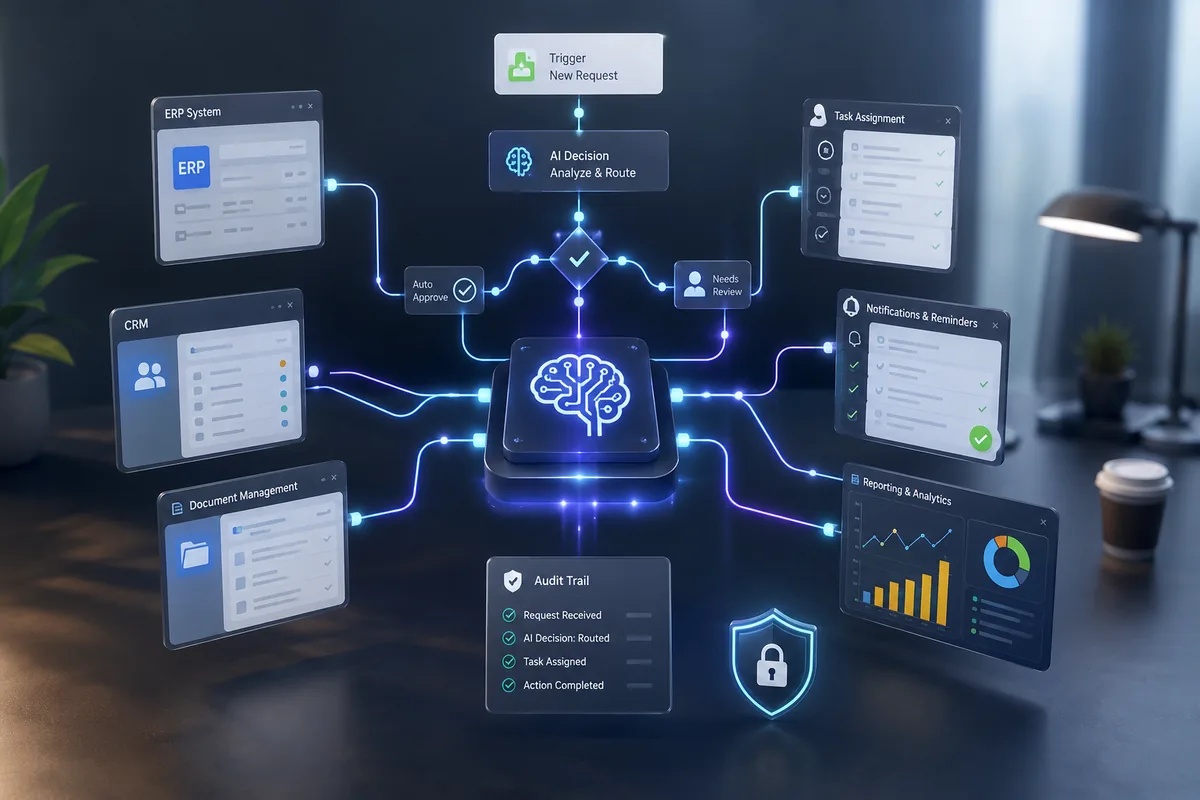
Intelligent Process Automation (IPA) combines workflow automation, AI, business rules, and system integrations to help organizations automate complex business processes.
Unlike traditional automation that follows rigid rules, intelligent automation can understand context, route work dynamically, handle exceptions, and keep processes moving across multiple systems.
The result is faster operations, fewer bottlenecks, improved visibility, and more scalable business processes.
Workflow Intelligence
Understands context and routes work dynamically based on your business rules.
System Integration
Connects processes across your CRM, ERP, databases, and every tool your team relies on.
Audit and Compliance
Maintains full audit trails and compliance logging across every automated process.
Key Capabilities
Key Capabilities
-
Smart decisions, not just task execution
-
Exception handling without constant human intervention
-
Multi-system workflow coordination
-
Audit trails and compliance logging
-
Automated routing, reminders, and task assignment
-
Real-time visibility into process status and performance
The Challenge
Why Businesses Struggle With Process Efficiency
Most operational difficulties do not arise from a lack of software. They stem from how work moves or fails to move through the organization.
Delayed Approvals
Requests sit in inboxes waiting for reviews, approvals, or next steps.
Endless Follow-Ups
Teams spend hours chasing updates, reminders, and status checks.
Repetitive Data Entry
Employees spend valuable time manually transferring information between systems.
Human Errors
Manual processes increase the risk of missed steps, incorrect data, and compliance issues.
As organizations grow, these inefficiencies become operational bottlenecks that impact productivity, customer experience, and scalability.
Explore What's Possible With Intelligent Automation
Every business has different workflows, challenges, and opportunities. Let's identify where intelligent process automation can create the biggest impact across your operations.
Service Scope
Business Processes We Commonly Automate
Here are six common business processes TechYard automates and the operational bottlenecks each one removes.






The Workflow
How Intelligent Process Automation Works
Intelligent automation helps work move efficiently from one stage to the next. A typical workflow might look like this:

Request Submitted
The request enters the system and is captured and sent to the right workflow automatically.
Information Verified
Required information is checked. Missing items are flagged early to avoid delays later in the process.
Decision Made
Business rules decide what happens next: assigning a task, triggering an approval, or moving the process forward.
Task Assigned
The right person, team, or department receives the task automatically. No manual follow-ups required.
Approval Completed
Approvals are tracked within the workflow. Reminders and notifications go out automatically if something is delayed.
Process Closed
Systems are updated and records saved. Your team gets a smoother process with better visibility and less manual work.
01
Request Submitted
When a customer request, submitted form, document, or internal process enters the system, the information is captured and sent to the right workflow automatically.
02
Information Verified
The system checks that all required information is available. If something is missing, it is flagged early to avoid delays later in the process.
03
Decision Made
Based on your business rules, the workflow decides what should happen next. This could mean assigning a task, triggering an approval, or moving the process forward.
04
Task Assigned
The right person, team, or department receives the task automatically. No manual follow-ups or email chains are required.
05
Approval Completed
Approvals are tracked and managed within the workflow. If something gets delayed, reminders and notifications can be sent automatically.
06
Process Closed
Once everything is completed, systems are updated and records are saved. Your team gets a smoother process with better visibility and less manual work.
Intelligent process automation keeps work moving forward without requiring manual coordination at every step.
How We Work
Our Approach To Intelligent Process Automation
Four structured steps that take your business processes from complex and manual to streamlined and automated.
Step 01
Discover
Analyze existing workflows, bottlenecks, dependencies, and improvement opportunities across your business operations.
Step 02
Simplify
Remove unnecessary complexity before automation begins so the final workflow is easier to manage and scale.
Step 03
Automate
Design and implement intelligent workflows tailored to your business processes, rules, systems, and goals.
Step 04
Optimize
Continuously monitor performance and refine workflows over time as your business grows and requirements change.
Why Us
Why Businesses Choose TechYard Systems
Process-First Approach
We improve workflows before introducing automation, ensuring the final system is clean, efficient, and easy to manage.

Built Around Your Operations
Every workflow is designed around your business processes and goals, not a generic template.

Seamless Integrations
Connect CRMs, ERPs, databases, support platforms, and business applications your team already relies on.

Business-Focused Outcomes
Our goal is efficiency, visibility, consistency, and operational performance — not just technical delivery.

Ready To Eliminate
Process Bottlenecks?
If your team is spending too much time on repetitive processes, manual approvals, and administrative work, TechYard Systems can help identify where intelligent automation can create the biggest impact.
Or email us directly at contactus@techyardsystems.com
Frequently Asked
Questions
Common questions about intelligent process automation, timelines, integrations, and what to expect when working with TechYard Systems.
Intelligent Process Automation combines workflow automation, AI, and system integrations to automate complex business processes and improve operational efficiency.
Traditional automation follows predefined rules. Intelligent Process Automation can handle exceptions, coordinate workflows across systems, and adapt to changing business conditions.
Approvals, onboarding, document handling, service requests, data entry, and repetitive administrative workflows are often ideal candidates.
Yes. Automation workflows can connect CRMs, ERPs, HR systems, databases, support platforms, and other business applications.
Timelines depend on workflow complexity, integrations, and business requirements. Simpler processes can often be automated quickly, while larger transformations require additional planning.
Related Services