
Industry
Logistics & Fleet Operations
Business Type
Enterprise AI Portal Module
Services Delivered
Agent Design, Integration & Build
Platform
FleetHunt + Samsara Integration
Overview
The Logistics AI Agent is a specialized AI assistant built for fleet and transportation operations. Instead of logging into multiple tracking dashboards, a fleet manager simply asks a question in plain English, such as which vehicles are moving right now, what the driver safety scores look like this week, or whether there are any Hours of Service violations today, and the agent pulls live data, renders it as interactive maps and KPI cards, and delivers an actionable summary. It fuses FleetHunt GPS tracking and the Samsara fleet management platform into a single conversational interface, backed by more than 25 specialized tools the AI can call on demand.
Two Live Platforms, One Chat
FleetHunt's real time GPS feed and Samsara's enterprise telematics are fused into a single conversational interface, so managers never have to switch dashboards.
Connected to multiple Fleet Tools
The AI automatically chooses the right connected system for every request, gathering real-time fleet insights from multiple sources in a single conversation.
Real-Time Visual Insights
Fleet information is displayed through live maps, analytics, KPI (Key Performance Indicator) cards, and charts, giving operators an interactive view of their operations.
Key Features
Everything a fleet manager needs, surfaced through one conversational interface.
Live Fleet Map
Interactive map rendered inline in chat, colored pins for moving, idle, stopped, and speeding vehicles.
Real Time Tracking
Instant GPS location, speed, heading, ignition status, and odometer for every vehicle.
Fleet Status Summary
One glance counts of moving, idle, and stopped vehicles, as KPI (Key Performance Indicator) cards and a donut chart.
Driver Safety Scores
Harsh braking, harsh acceleration, speeding, and crash metrics per driver, over any time window.
HOS (Hours of Service) Compliance
ELD (Electronic Logging Device) duty logs and Hours of Service violation alerts to keep the fleet DOT (Department of Transportation) compliant.
Fuel & Energy Analytics
Fuel consumption, MPG (Miles Per Gallon) efficiency, and idling waste reports across the entire fleet.
Proximity & Speed Search
Find vehicles within a set radius, or vehicles doing 90 to 100 mph and where they are.
Dashcam Media Retrieval
Pull recorded dashcam images and video clips from any vehicle at a specific moment.
Shareable Live Tracking
Generate live GPS map links that can be embedded or shared outside the portal.
Trip & Equipment History
Full trip logs covering distance, duration, and fuel, plus trailer and asset tracking.
One Click Reports
Every answer is downloadable as PDF (Portable Document Format), Excel, CSV (Comma-Separated Values), Word, or plain text, in one click.
Anomaly Highlighting
The AI proactively flags speeding, long idle times, and HOS violations in every summary.
How It Works
Three steps, start to finish, every time a manager asks a question.
Ask
The manager types, or speaks, a plain English question in the chat.
Fetch
The AI selects the right tool, calls FleetHunt or Samsara's live API (Application Programming Interface), and retrieves the data.
Act
Results return as interactive maps, KPI (Key Performance Indicator) cards, and charts, with a recommended next action.
End to End
Streamed Live
Not a static report, a real time conversation.
FleetHunt, Real Time GPS Tracking
The Logistics agent connects to two live fleet platforms. FleetHunt is the fast, real time layer, best for "where is everything right now" queries, backed by 8 dedicated tools.
- Live Vehicle Positions — location, speed, ignition status, heading, and odometer for every vehicle.
- Status Filters — instant moving, idle, and stopped filters across the whole fleet.
- Speed & Proximity Search — find vehicles doing 90 to 100 mph, or within 10 km of a location.
- Shareable Live Tracking — generate a fleet summary or a live map link that can be shared outside the portal.
Samsara, Enterprise Fleet Management
Comprehensive telematics covering drivers, safety, compliance, fuel, and media, across nine tool categories and 15+ tools.
Vehicles & Drivers
Vehicle diagnostics plus a driver roster with safety scores and harsh event breakdowns.
Compliance & Safety Events
HOS (Hours of Service) logs and violations, plus harsh braking, acceleration, crash, and near collision events.
Fuel, Trips & Dashcam
Fuel and idling reports, full trip history, on demand dashcam clips, and trailer or asset tracking.
By the Numbers
Real time streaming responses, no page reloads. Plain English interface, zero training required.
0
Specialized Tools
0
Live Platforms Fused
0
Vehicle States, Live
0
Export Formats
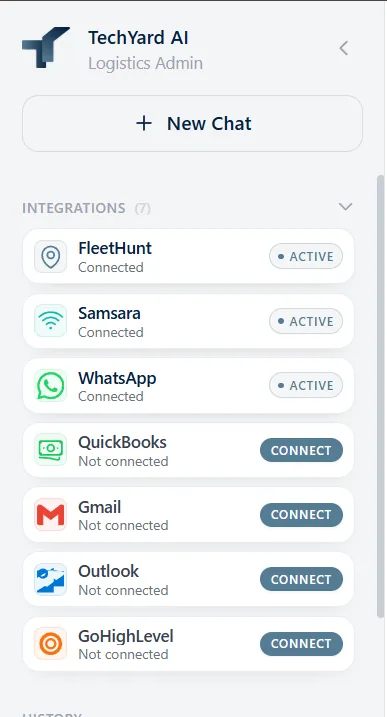
Shared Communication Integrations
Optional, admin enabled channels that let the Logistics agent reach the rest of the business, not just the fleet, all managed from the same integrations panel shown here.
Gmail / Outlook — search, read, draft, and send fleet reports by email.
Slack — post fleet updates to a dedicated logistics workspace.
WhatsApp via Twilio — send fleet alerts to drivers and managers, already active in this build.
QuickBooks & GoHighLevel — manage fuel vendors and bills, and keep contact pipelines current.
Part of a Larger AI Portal
The Logistics agent is one department inside TechYard's multi department enterprise AI system, sharing the same admin console, analytics, and CRM integration as every other team.
Multi-Department Portal
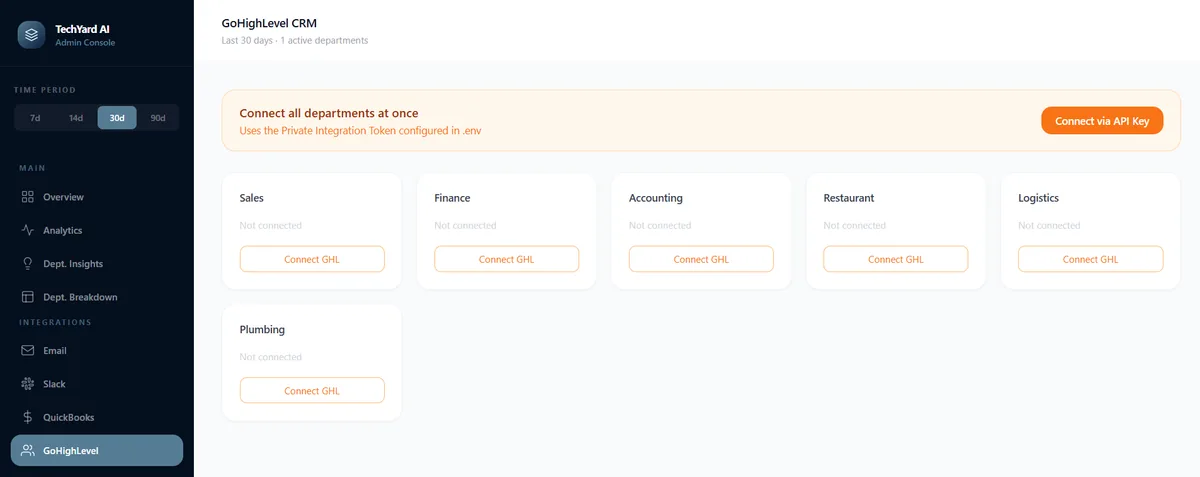
One Console, Every Department — Sales, Finance, Accounting, Restaurant, Logistics, and Plumbing all connect through the same admin console.
Per Department CRM (Customer Relationship Management) Sync — each department connects its own GoHighLevel pipeline independently, with a one click API (Application Programming Interface) key setup.
Portal Analytics
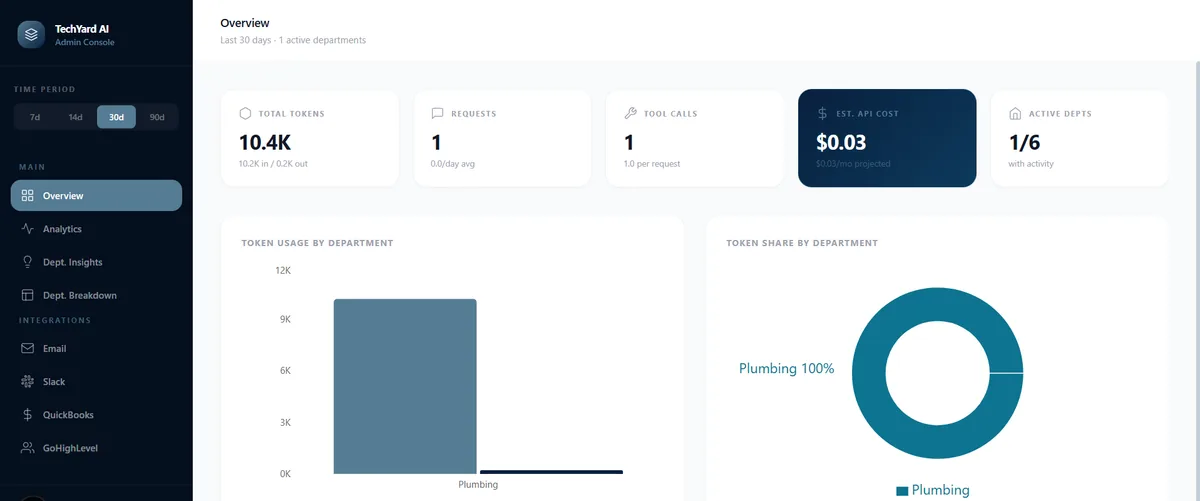
Usage Transparency — token usage, request volume, and estimated API cost are visible in real time, never a surprise invoice.
Per Department Breakdown — token share charts show exactly which department is driving usage, Logistics included.
Cross-Department Insights
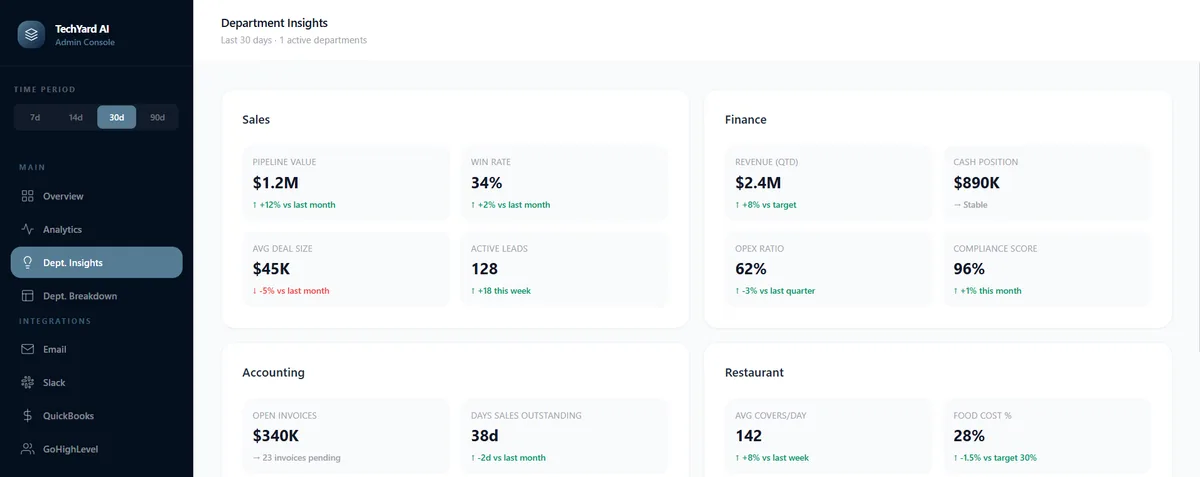
Live Business Metrics — pipeline value, revenue, and compliance scores update automatically across every connected department.
One Platform, Every Team — the same architecture behind the Logistics agent scales to any department TechYard builds next.
See It In Action
Real questions a fleet manager can type straight into the chat, and the summaries that come straight back.
Give me a summary of the entire fleet, how many vehicles are moving, idle, and stopped?
Fleet Status Summary
PDF- 210 total vehicles in the fleet
- 115 vehicles moving (54.8% of fleet actively in transit)
- 8 vehicles idle (engine running, stationary)
- 87 vehicles stopped (engine off, 41.4% of fleet)
Recommendation: Monitor the 8 idle vehicles. If any have been stationary for over 15 minutes with engines running, investigate for potential fuel waste or delivery delays.
"Where are my vehicles right now?"
Renders a live interactive map with colored status pins.
"Which vehicles are doing 90 to 100 mph?"
Runs FleetHunt's speed range and proximity search together.
"Show me driver safety scores this week"
Pulls harsh braking, acceleration, and speeding metrics per driver.
"Any Hours of Service violations today?"
Checks ELD (Electronic Logging Device) duty logs and flags DOT (Department of Transportation) compliance risks.
"Get a dashcam clip from Truck 12 at 3 PM"
Retrieves the recorded clip for that vehicle and timestamp.
"Email this fleet report to operations"
Drafts and sends the report through the connected Gmail integration.
Technology Stack

Python 3.12 + FastAPI

Anthropic Claude
sse-starlette Streaming

SQLAlchemy + SQLite

Next.js 15 + React 19

TypeScript + Tailwind CSS
Recharts
OpenStreetMap
Web Speech API
Value Proposition
The Logistics AI Agent replaces the daily grind of juggling multiple fleet dashboards with a single conversation. Managers get real time visibility, safety compliance, and cost insights in the time it takes to type a question. It's enterprise fleet telematics, reimagined as a chat.
Real Time Fleet Visibility
Every vehicle's location, speed, and status is one question away, rendered as interactive maps and KPI (Key Performance Indicator) cards.
Proactive Safety & Compliance
The AI surfaces speeding, long idle times, and HOS (Hours of Service) violations before they become bigger problems.
Area
Outcome
Visibility
Live locations, safety scores, and fuel reports for the entire fleet, surfaced in one chat
Safety & Compliance
HOS (Hours of Service) violations and harsh driving events are flagged automatically, keeping the fleet DOT (Department of Transportation) compliant
Speed
Answers stream back in seconds, no logging into separate GPS or telematics dashboards
Cost Insight
Fuel efficiency and idling waste reports are one question away, downloadable in eight formats
Ready to Automate
Your Business Workflows?
Book a 15 minute discovery call. We'll evaluate your operations and recommend a tailored AI solution with a step-by-step implementation plan.
Talk to UsOr email us at contactus@techyardsystems.com